
Requesting a correction to my credential
Before accepting your credential, check that the data it shows (name, dates, program, or other information) is correct.
⚠️ Important: this option is only available if your issuer enabled correction requests for their credentials. If you don’t see this option on your acceptance screen, contact your issuer directly.
How to request a correction
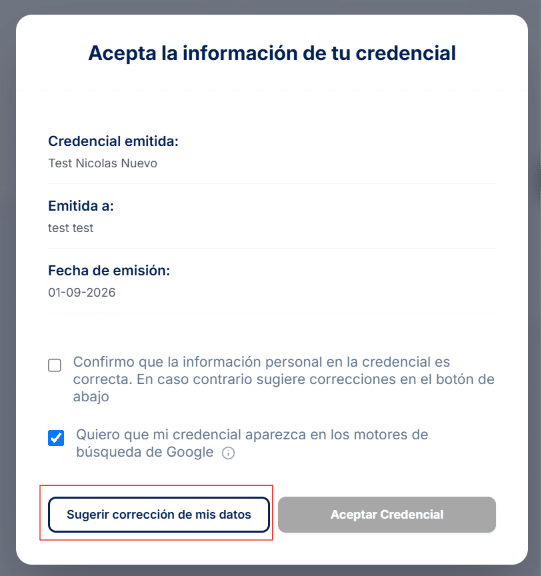
- Open your credential’s link and click Suggest a correction to my data, next to the acceptance button.
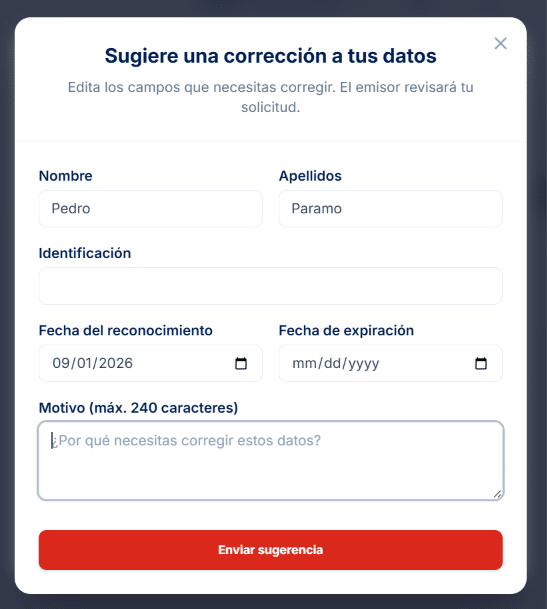
- In the form that opens, edit the fields you need to correct (first name, last name, ID, award date, or expiration date) and, if you like, explain the reason (optional, 240 characters or less).
- Click Send suggestion.
Your credential changes to In review status and your issuer receives the request. While they review it you can’t accept it: if you open the link again, you’ll see a message saying your personal information is under review and that you’ll be notified once there’s a response.
What happens next
Your issuer can respond in three ways, and in every case you receive an email:
- They approve the correction: your credential goes straight to Accepted with the corrected data. The email includes the link to your credential and you don’t have to accept it again.
- They reject the correction: your credential goes back to Pending status, unchanged, and the email includes the reason. You can accept it as it is or send a new suggestion.
- They correct the data themselves: your credential goes back to Pending with the information the issuer updated, and you can accept it from the link in the email.
🔎 Note: requesting a correction isn’t the same as rejecting a credential. Use it only when the content has an error, not when you don’t recognize why you were granted it.